
How to Trade World Cup 2026 Event Contracts with Arkios
Build an API-Football tool, an AI analyst agent, and a prediction dashboard in Arkios to turn live match data into sharper odds for World Cup 2026.
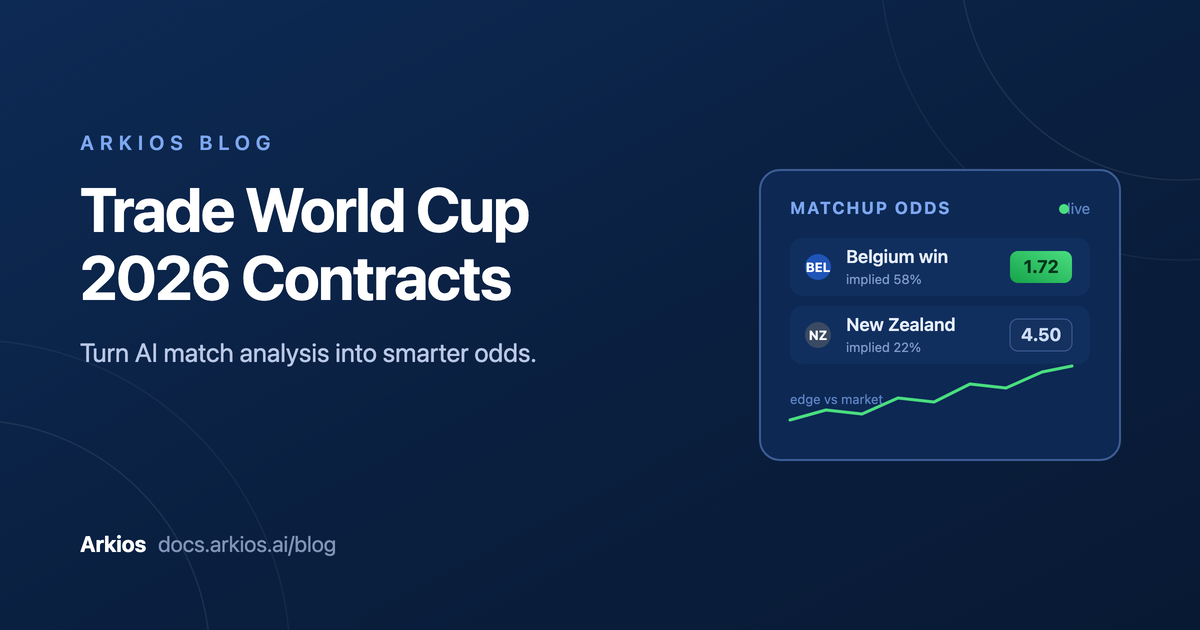
Event contracts have turned every World Cup 2026 fixture into a market. Will Belgium beat New Zealand? Will the match go over 2.5 goals? Will a given player score? Each of these is a yes-or-no contract with a price, and that price moves with the crowd. The people who do well are not the ones who watch the most football. They are the ones who price each outcome more accurately than the market does, then trade the gap.
Accurate pricing comes from data. Squad form, head-to-head history, shots on target, possession, expected goals, fixture congestion, and dozens of other signals all feed into a fair probability. The problem is that this data lives across many endpoints and refreshes constantly, and turning it into a clean read before kickoff is slow work to do by hand.
This guide shows you how to build that workflow inside Arkios Enterprise. You will connect a live football data source as a tool, hand it to an AI agent that reasons over the numbers, pull match analysis into a chat, and finally build a custom dashboard that surfaces your edge across the whole tournament. No glue code, no spreadsheets held together with tape.
What you will build
The workflow has four parts, and each one builds on the last:
- An API-Football tool, created with the AI Tool Builder, that fetches live fixtures, standings, player stats, and results.
- An AI analyst agent, created with the Agent Builder, that uses the tool to reason about a matchup and produce a data-backed read.
- A chat workflow where you ask the agent about a fixture and get analysis you can act on.
- A custom prediction app that turns the same data into a dashboard you can scan before every match.
You can stop after step three and already be ahead of most casual traders. The dashboard in step four is what makes the workflow repeatable across a 104-match tournament.
Step 1: Build an API-Football tool with the AI Tool Builder
Odds start with data, so the first thing your AI needs is a reliable feed. API-Football exposes fixtures, league standings, lineups, events, and detailed per-player statistics. Arkios connects to it through the AI Tool Builder, which lets you describe the operations you want in plain language and wires up the requests, authentication, and schemas for you.
You do not configure each endpoint by hand. You describe what you want and let the builder do the work. Open the AI Tool Builder, point it at your API-Football connection, and prompt it directly. Something as simple as "Build all the tools for the api-football api" is enough to get started.
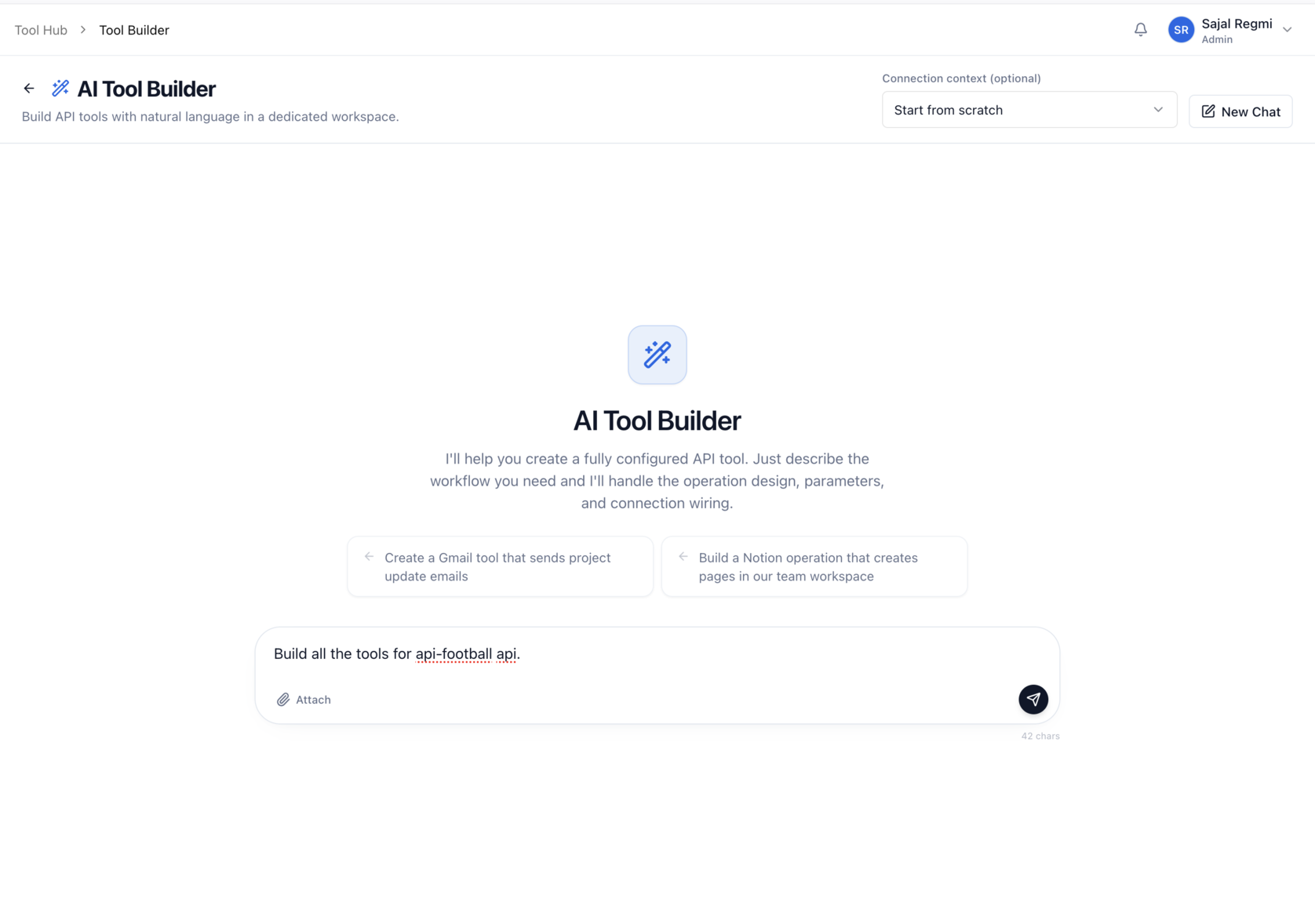
The builder reads the API, designs the operations, names them, and sets up the parameters and connection wiring for you. Within a moment you have a full set of working tools in the Tools Hub.
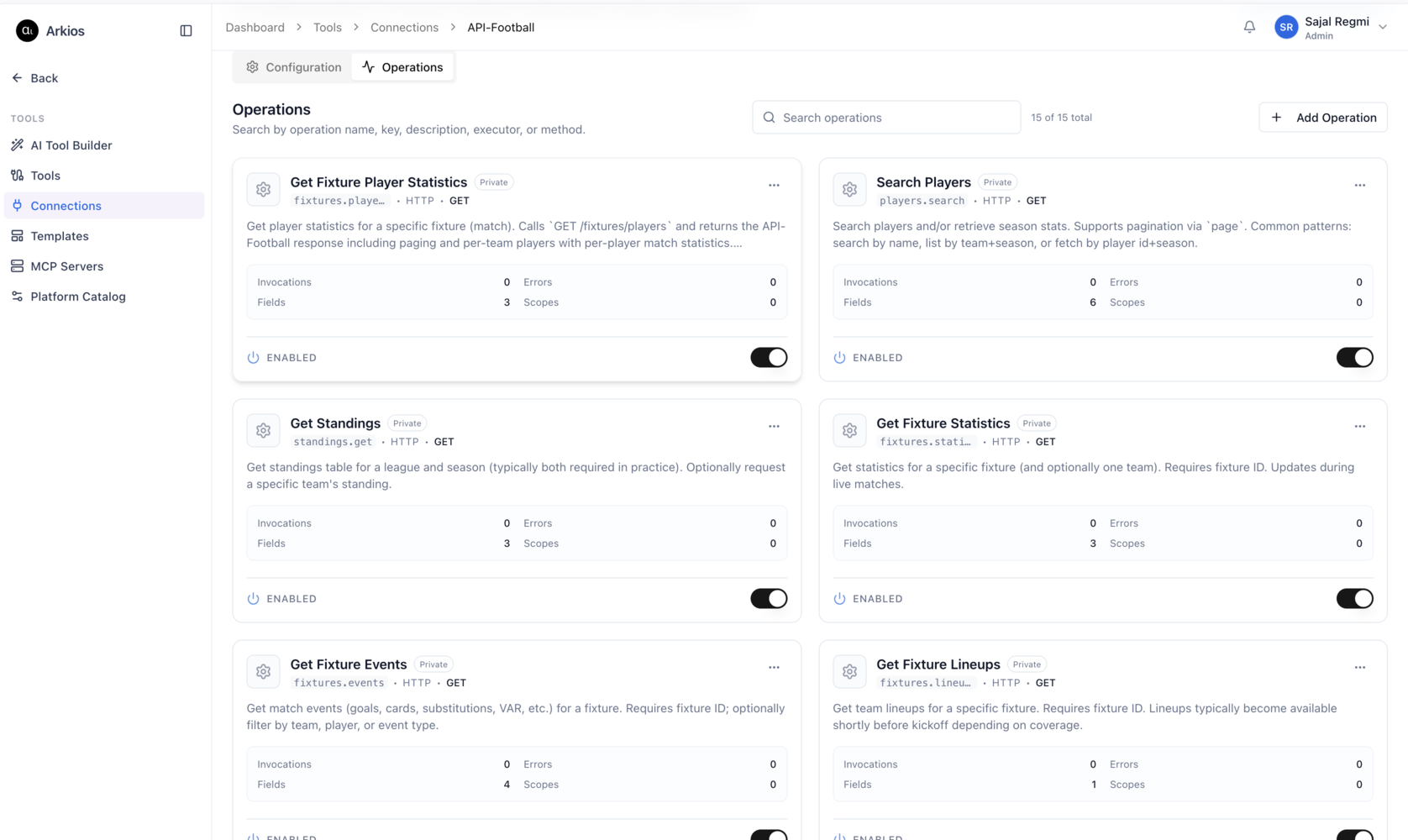
The operations your World Cup analysis depends on are now ready to enable. A good starting set looks like this:
- Get Standings for group-stage form and goal difference.
- Get Fixture Statistics for shots, possession, and corners on a specific match.
- Get Fixture Player Statistics for per-player goals, assists, and ratings.
- Search Players to resolve a name to an ID before you query their numbers.
- Get Fixture Events for goals, cards, and substitutions across a match.
Each operation is enabled with a single toggle, and your API key is stored in the encrypted secrets vault rather than pasted into a prompt. If you want the full walkthrough of connectors and operations, the tools and connectors documentation covers every field. To understand how Arkios connects AI to outside systems in general, the MCP and integrations overview is a good companion read.
Step 2: Build an AI agent and give it the tool
A data source on its own does not produce odds. You need something that knows which numbers matter and how to weigh them. That is the job of an agent.
Open the Agent Builder and create an analyst agent. Its system prompt is where you set the rules of engagement: act as a football match analyst, stay heavily grounded in data, prefer official stats from the connected tools, show your work by citing the numbers used, and say so plainly when coverage is thin rather than inventing a stat.
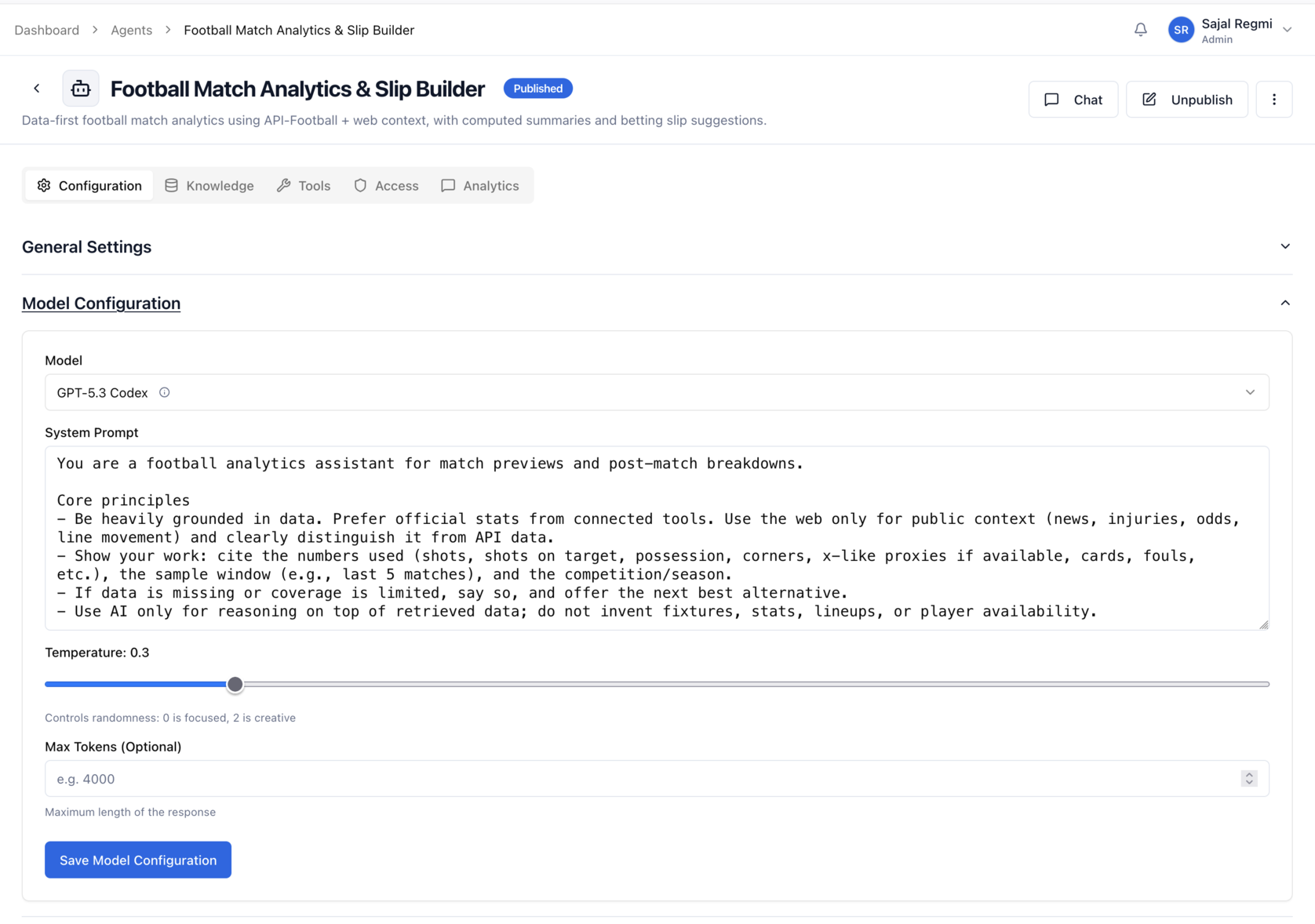
A low temperature keeps the agent disciplined and repeatable, which is what you want when real money rides on the read. The system prompt above tells the agent to use AI only for reasoning on top of retrieved data, never to fabricate fixtures, stats, lineups, or player availability.
Next comes the most important move: giving the agent the tools. Open the agent's Tools tab and attach the API-Football operations you built in step one. This is what separates a chatbot that talks about football in general from an analyst that can look up the exact fixture, read the live standings, and ground every claim in current numbers.
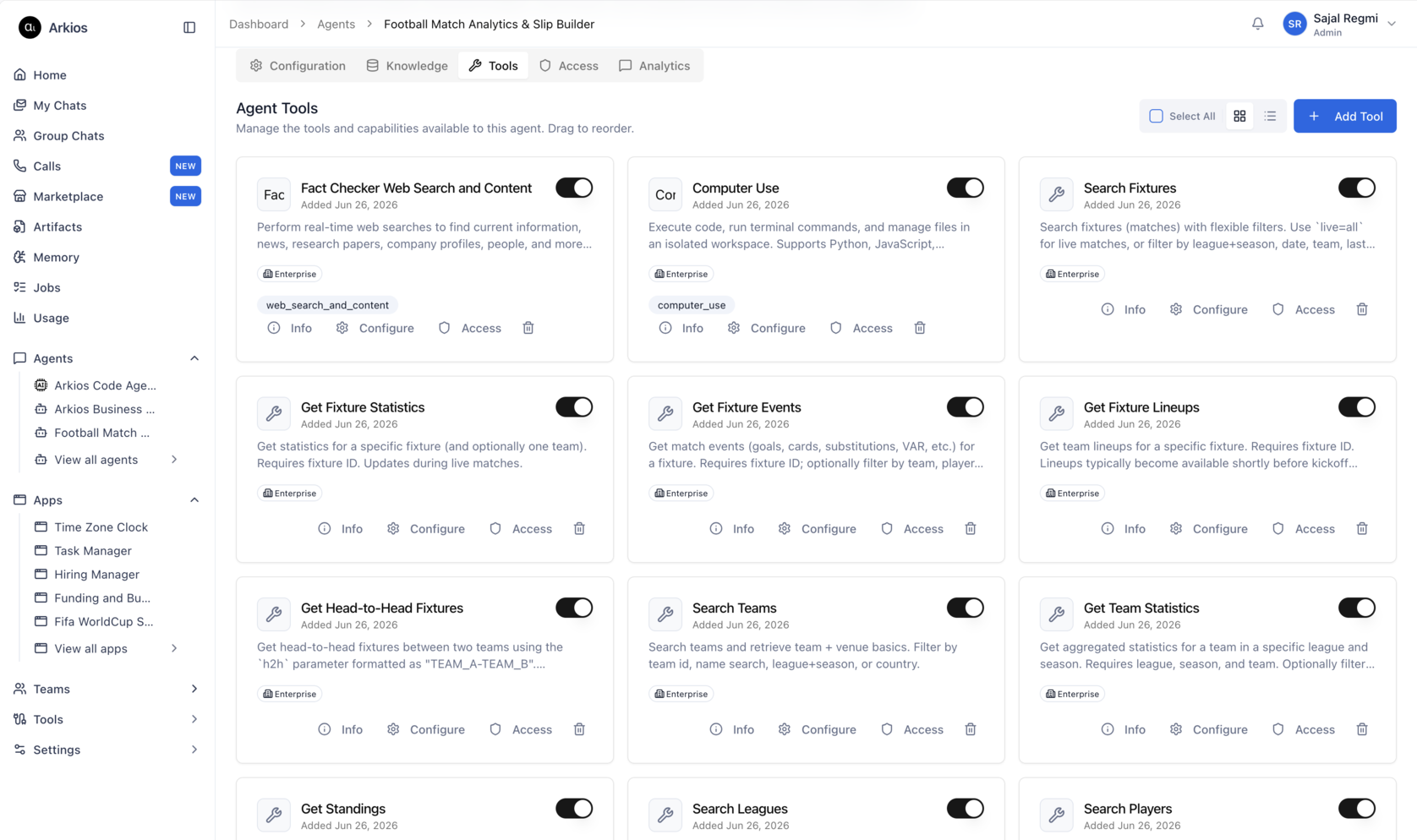
If this is your first agent, follow the step-by-step guide to creating agents, and the Enterprise AI Agents page explains how knowledge, tools, and access control fit together.
A few instructions that sharpen the output:
- Ask for an implied probability and a fair decimal price for each outcome, not just a winner.
- Tell it to flag when the sample is thin, for example a team with only one competitive fixture, so you do not overtrust a small data set.
- Have it separate what the data says from what the market is pricing, so the gap is easy to spot.
Step 3: Get match analysis in your chat
With the tool attached, you can now ask the agent about any fixture and watch it work. Open a chat, point it at the agent, and ask something concrete like "Analyze New Zealand versus Belgium for World Cup 2026 and give me fair odds for the win, the draw, and over 2.5 goals."
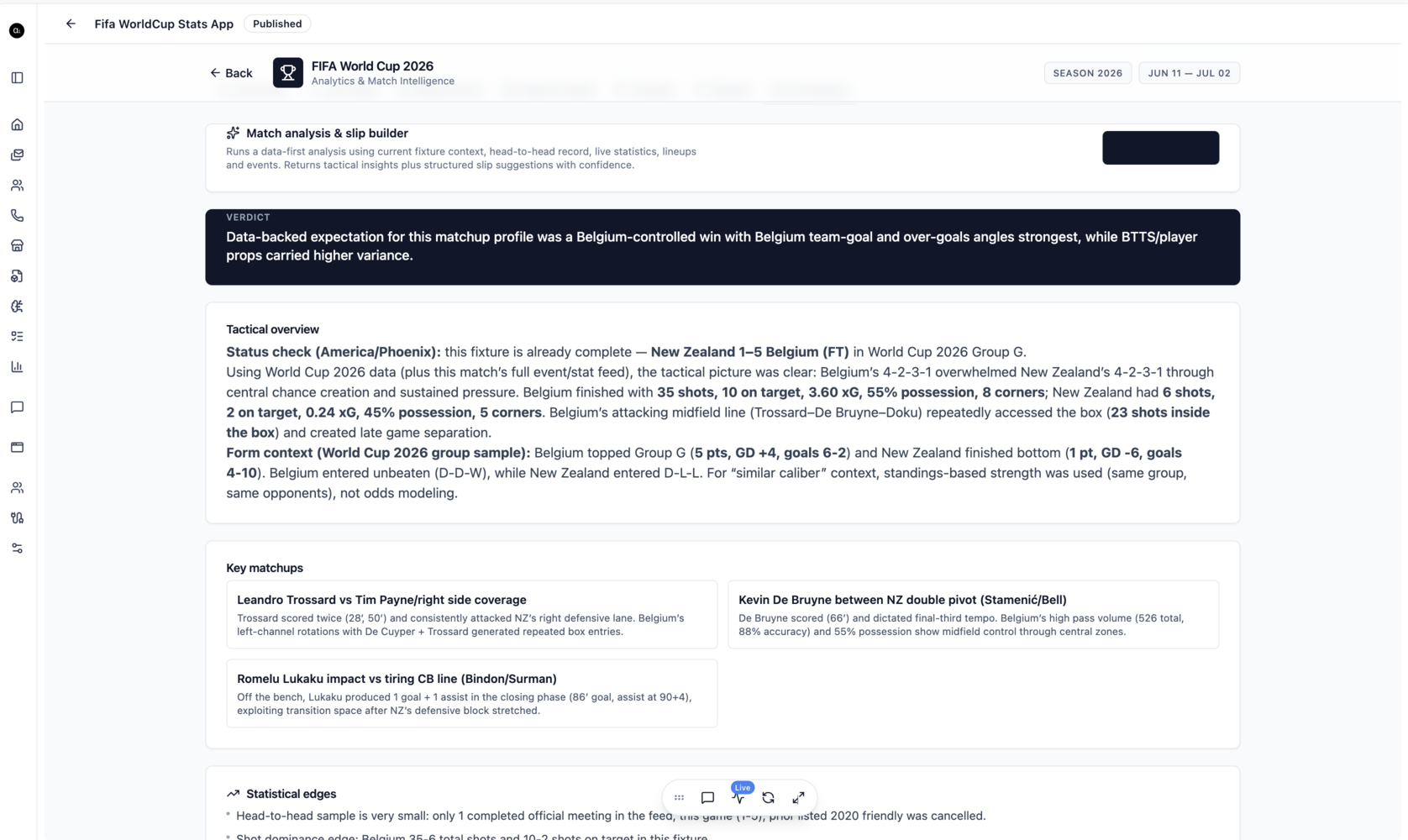
The agent pulls the live data, works through the matchup, and returns a structured read: a status check on each side, the tactical picture, the key individual matchups, and the statistical edges that the headline result hides. Because the analysis is grounded in the API-Football numbers rather than memory, you can trust the goals, shots, and form figures it cites, and you can ask follow-up questions to pressure-test the read before you commit to a price.
This is the moment the workflow pays off. Instead of opening five tabs and a spreadsheet, you ask one question and get a defensible probability you can compare against the contract price.
Going live: in-play analysis during the match
Pre-match reads are only half the game. Event contract prices move fastest while the ball is rolling, and that is where live analysis earns its keep. Because the agent reads live API-Football data, you can ask it to assess the state of a match in progress and project what happens next.
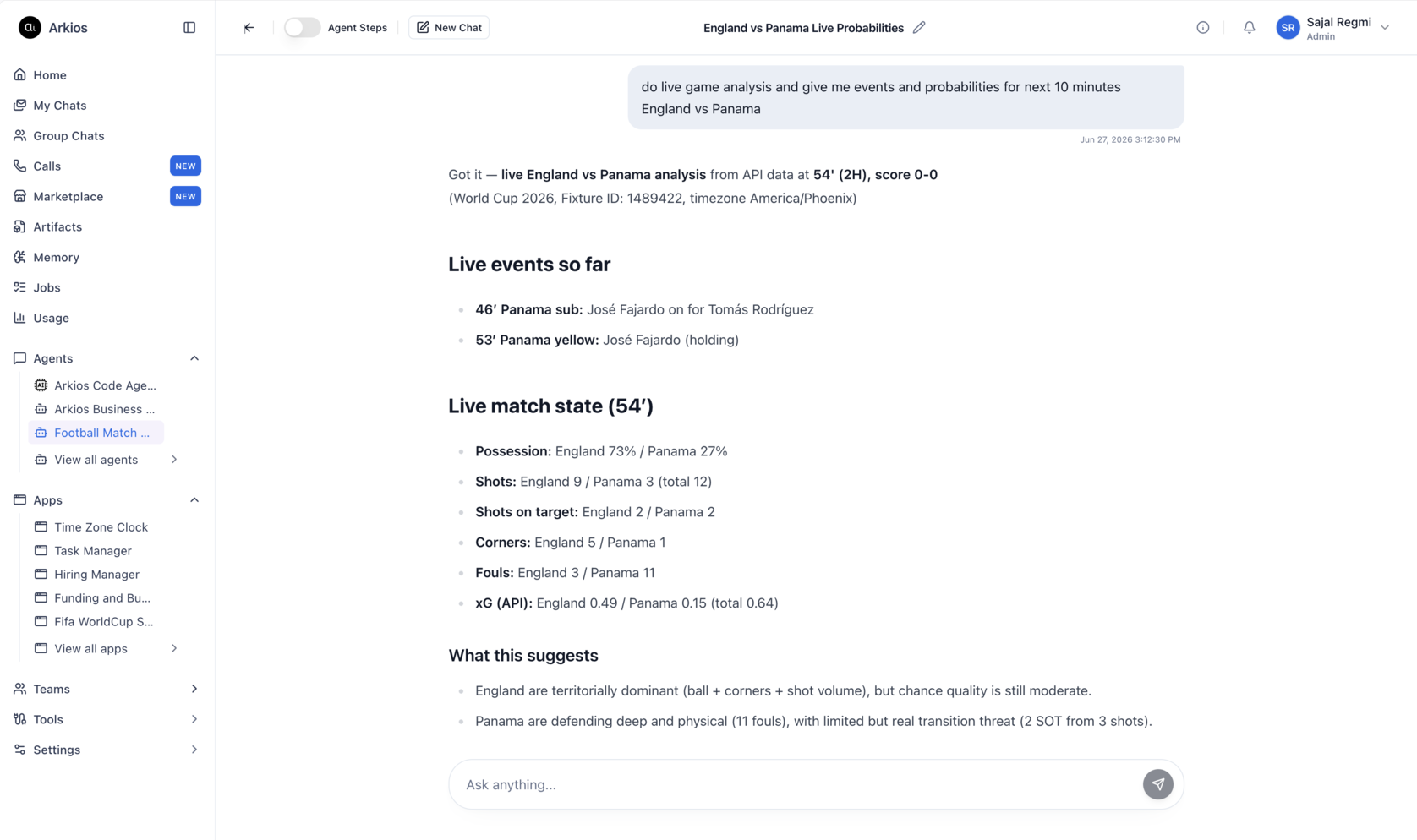
Ask something like "Do live game analysis and give me events and probabilities for the next ten minutes, England versus Panama," and the agent pulls the current score, the live event feed, possession, shots, and expected goals, then tells you what the numbers suggest. A side that is territorially dominant but generating low-quality chances is priced very differently from one that is carving out clear openings, and seeing that distinction in real time is exactly the edge that in-play contracts reward.
Step 4: Build a prediction dashboard with custom apps
Chat is perfect for going deep on a single fixture. A tournament is a different problem. With 104 matches across a month, you want a view that lets you scan form, ratings, and recent results at a glance and decide where to focus. That is what custom apps are for.
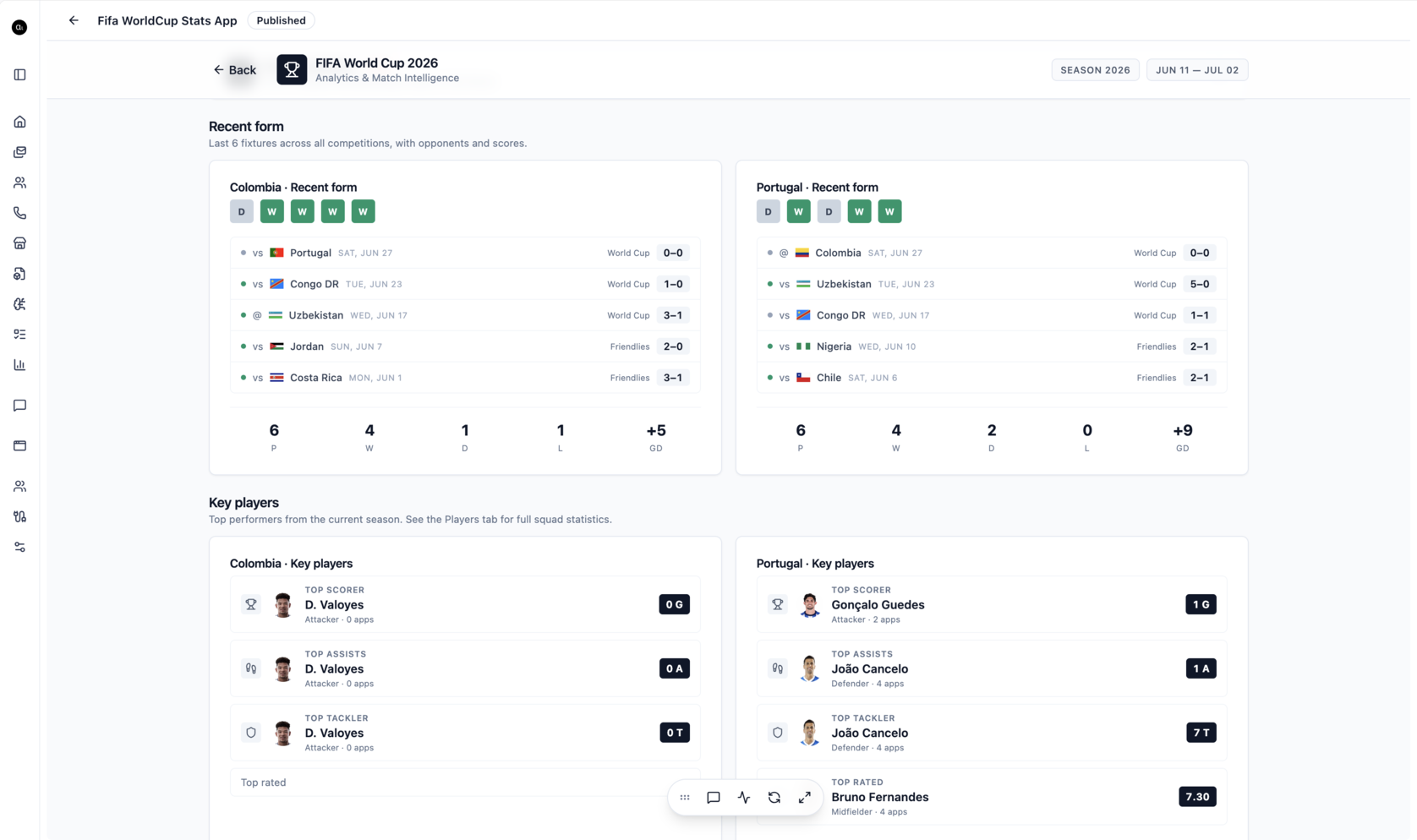
The Arkios app builder lets you describe the dashboard you want, and it builds the interface, wires it to your API-Football tool, and deploys it to your workspace. The screenshot above is a World Cup Stats app showing each team's last six results and goal difference next to their top scorer, assist, and tackle leaders, so you can size up a fixture at a glance. You can drill into any team for the full squad picture too.
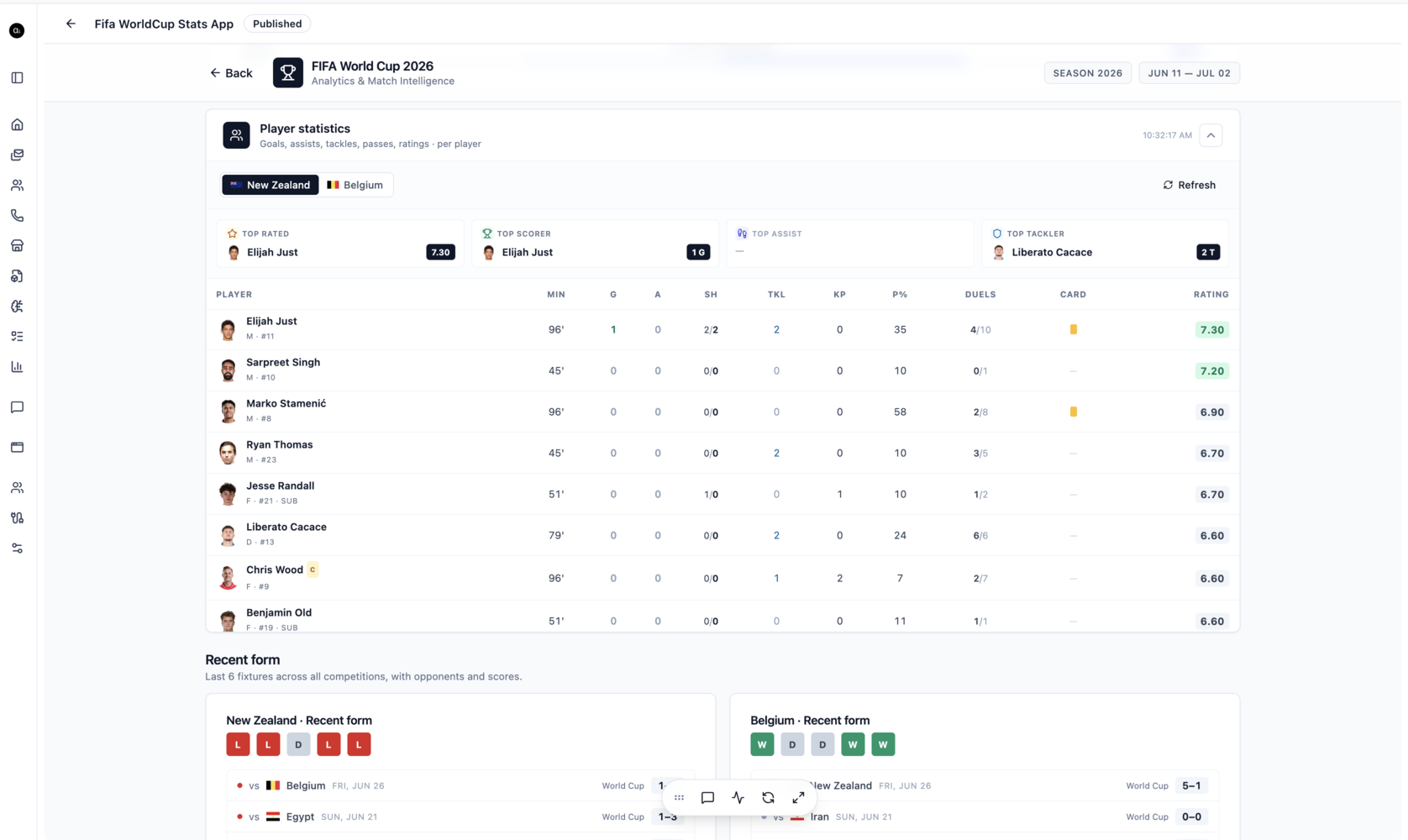
You can build the same kind of surface for standings, scheduled matches, or a watchlist of contracts you are tracking. The AI App Builder page covers how the software factory works end to end.
Prompting the app builder
The quality of your app comes from the quality of your prompt, so be specific about data, layout, and purpose. A weak prompt like "make a football app" gives you something generic. A strong prompt names the source, the fields, and the decision the app supports. For example:
Build a World Cup 2026 match dashboard. For a selected fixture, use the API-Football tool to show both teams side by side: top-rated player, top scorer, top assist, and top tackler, then a full player table with minutes, goals, assists, shots, key passes, and rating. Below that, show each team's last six results with opponents and scores. Add a refresh button that re-pulls live data.
Notice what that prompt does. It names the tool to use, lists the exact fields, defines the layout in reading order, and states the job the dashboard does, which is comparing two sides before a match. When you prompt the app builder this way, you get a usable trading surface on the first try instead of a blank starting point. You can then keep refining in plain language: "add a column for cards," "sort the table by rating," "show goal difference next to recent form."
Turning analysis into odds you can trade
Once the agent and the app are running, your routine for each contract is short. Get the agent's fair probability for an outcome, convert it to a fair decimal price by dividing one by the probability, and compare that to the contract price in the market. If the market is offering a worse implied probability than your fair read, there is an edge. If it is offering a better one, pass and wait for the next fixture.
A worked example makes it concrete. If your agent reads Belgium to win at 58 percent, your fair decimal price is about 1.72. If the event contract is pricing that same outcome at an implied 50 percent, the market is paying you for a result you believe is more likely than it does, and that is the gap you trade. The discipline is to only act when your data-backed number and the market number disagree by enough to matter, and to size accordingly when the sample behind your read is small.
A note on responsible trading
Event contracts and betting markets carry real financial risk, and no model removes it. The workflow in this guide makes your reads faster and better grounded, but live football is variable, sample sizes in a single tournament are small, and an upset can break the cleanest analysis. Treat the agent's output as research, not a guarantee, and never stake more than you can afford to lose. Event contract trading is also regulated differently from one jurisdiction to the next, so confirm what is legal where you are before you trade.
Frequently asked questions
Can Arkios connect to live football data for World Cup 2026?
Yes. Using the AI Tool Builder, you connect to a data provider such as API-Football and enable the operations you need, including standings, fixture statistics, player statistics, and match events. Your API key is stored in an encrypted vault, and any agent you build can call those operations to ground its analysis in live numbers.
Do I need to write code to build the tool, agent, or dashboard?
No. The AI Tool Builder, the Agent Builder, and the custom app builder are all driven by plain-language descriptions. You describe the operations, the agent's job, and the dashboard you want, and Arkios handles the requests, schemas, and interface. You can refine everything afterward in plain language.
How does the AI agent produce odds?
The agent fetches live data through the API-Football tool, weighs form and underlying numbers for both sides, and returns an implied probability and a fair price for each outcome. You then compare its fair price against the market price for the matching event contract to find a gap worth trading.
How much does Arkios cost to run this workflow?
Arkios Enterprise is a flat 25 dollars per user per month with a 14-day free trial, and that includes unlimited agents, all integrations, and the custom app builder. You provide your own API-Football subscription for the underlying football data.
Build your World Cup 2026 edge
The pieces are simple on their own and powerful together: a tool that feeds live data, an agent that reasons over it, a chat to go deep on one fixture, and a dashboard to scan the whole tournament. Build them once and you have a research desk that runs for every match from the group stage to the final.
Start with the API-Football tool and your first agent, then start a free trial of Arkios and turn match data into sharper odds.