
MCP for Enterprises: Connecting AI to Your Internal Tools
What the Model Context Protocol is, why it matters for enterprise AI, and how to roll out MCP securely across your internal tools and teams.
An AI model is only as useful as what it can reach. The most capable model in the world, sitting behind a chat box with no access to your CRM, your billing system, your databases, or your internal APIs, can summarize documents and draft emails — and not much else. The moment you ask it to "pull the latest invoices for this account" or "check the deployment status in our internal dashboard," it hits a wall.
This is the integration problem, and it has quietly become the biggest blocker to enterprise AI adoption. Most large organizations run dozens or hundreds of internal systems. Connecting an AI assistant to each one has traditionally meant a custom integration: a one-off API wrapper, bespoke authentication handling, hand-rolled error handling, and a maintenance burden that grows with every new tool. Multiply that by every AI application your teams want to build, and the math stops working.
The Model Context Protocol (MCP) exists to fix exactly this. This guide explains what MCP is, why it matters for enterprises specifically, and how to roll it out in a way your security team will actually approve.
What is the Model Context Protocol (MCP)?
The Model Context Protocol is an open standard that lets AI models securely connect to external tools and data sources. In plain English: it's a common language that AI applications and your internal systems can both speak, so you don't have to build a custom bridge between every model and every tool.
MCP was introduced by Anthropic in late 2024 and released as an open standard from day one. Since then it has been adopted broadly across the industry — major AI providers, developer tools, and enterprise software vendors now ship MCP support — making it the de facto standard for connecting AI to external systems, much the way REST became the default for web APIs.
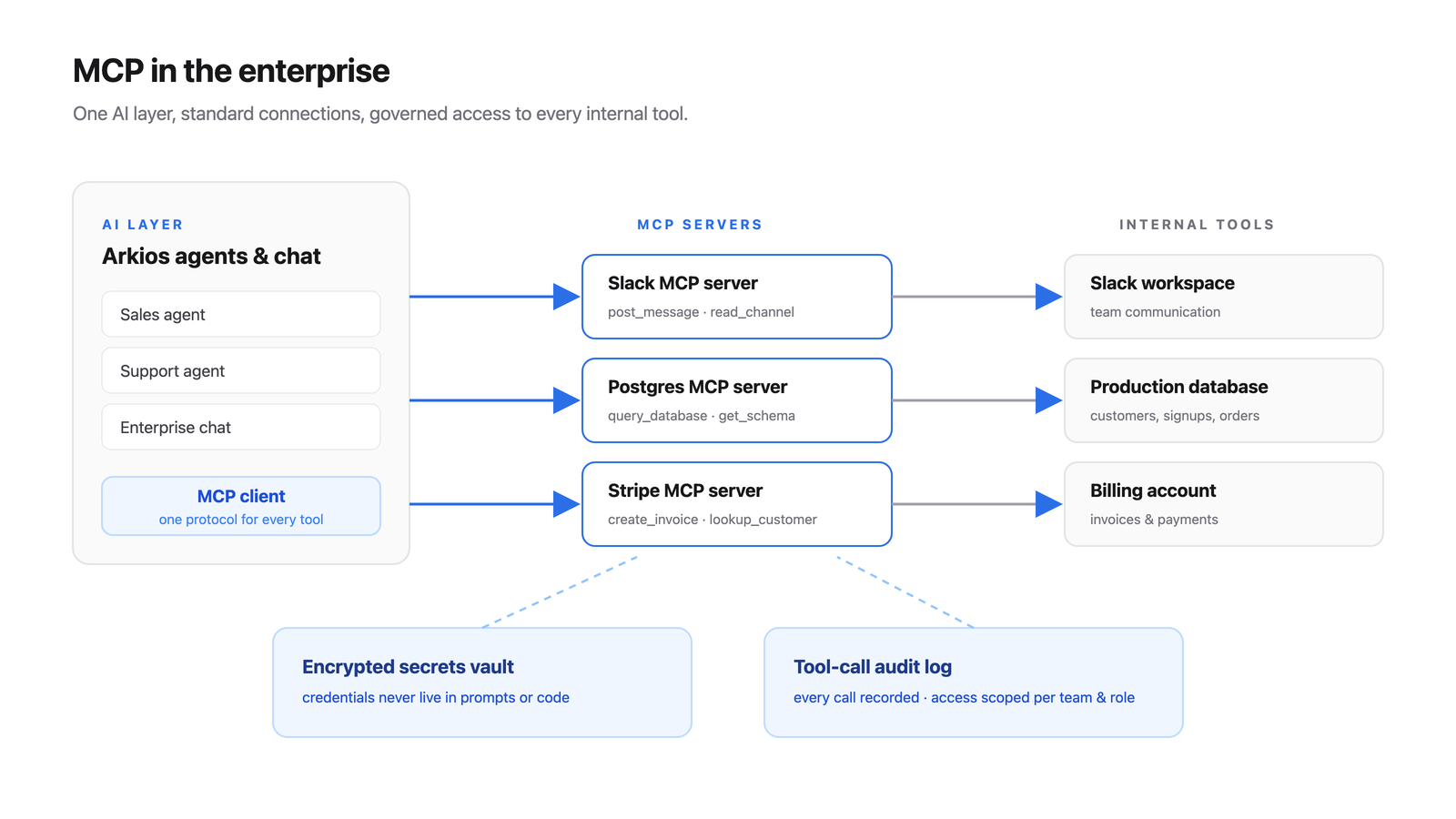
The architecture is straightforward. An MCP server sits in front of a system you want to expose — a database, a SaaS product, an internal API — and publishes a set of tools the AI can call, each with a defined name, description, and input schema. An MCP client (the AI application) discovers those tools at connection time and invokes them when the model decides they're needed. The protocol handles the plumbing: tool discovery, structured inputs and outputs, and error reporting.
Why does this beat one-off API integrations?
- Build once, connect everywhere. An MCP server you stand up for your billing system works with any MCP-compatible AI application — not just the one you originally built it for. With custom integrations, every new AI app means re-doing the work.
- Tools are self-describing. The model learns what a tool does and how to call it from the server's own metadata. There's no glue code to write or keep in sync when the tool changes.
- Clean separation of concerns. The team that owns a system owns its MCP server. AI teams consume tools without needing to understand the internals of every backend they touch.
- A shrinking, not growing, maintenance surface. One protocol implementation replaces N bespoke integrations. When the underlying API changes, you update one server — not every AI application that depended on it.
Why MCP matters for enterprise AI
For a solo developer, MCP is a convenience. For an enterprise, it changes what's feasible. Three properties matter most.
Standardization across the organization
Without a standard, AI integrations accumulate as tribal knowledge: each team wires up its own connections, in its own style, with its own assumptions. Six months later you have a dozen incompatible integration patterns and no inventory of what AI can actually touch. MCP gives every team the same contract. Tools are defined, discovered, and called the same way regardless of which system sits behind them — which means platform teams can build shared infrastructure for credentialing, logging, and access control once, and every integration inherits it.
Security boundaries you can actually enforce
When AI access to internal systems flows through a defined protocol layer, that layer becomes a natural enforcement point. You can decide which tools exist, who can use them, what credentials they run under, and what gets logged — in one place, rather than scattered across application code. Compare that to embedding API keys directly in agent prompts or application configs, where access is invisible and revocation means a code change. With MCP, the question "what can our AI agents reach, and under whose authority?" has an auditable answer.
Reusability across agents
Enterprises rarely stop at one AI agent. A support agent, a sales-ops agent, and a finance agent might all need to look up customers in the same CRM. With MCP, the CRM connection is built once and shared; each agent gets access to exactly the tools it needs. New agents go from idea to working prototype in hours instead of weeks, because the integration layer already exists. This compounding effect — every new tool benefits every current and future agent — is the real economic argument for MCP in the enterprise.
How to roll out MCP in your enterprise
Standing up MCP doesn't require a platform-engineering project. Here's the practical rollout path using Arkios, which supports MCP servers natively alongside a Tools Hub of ready-made connector templates.
Step 1: Add an MCP server or pick a connector template
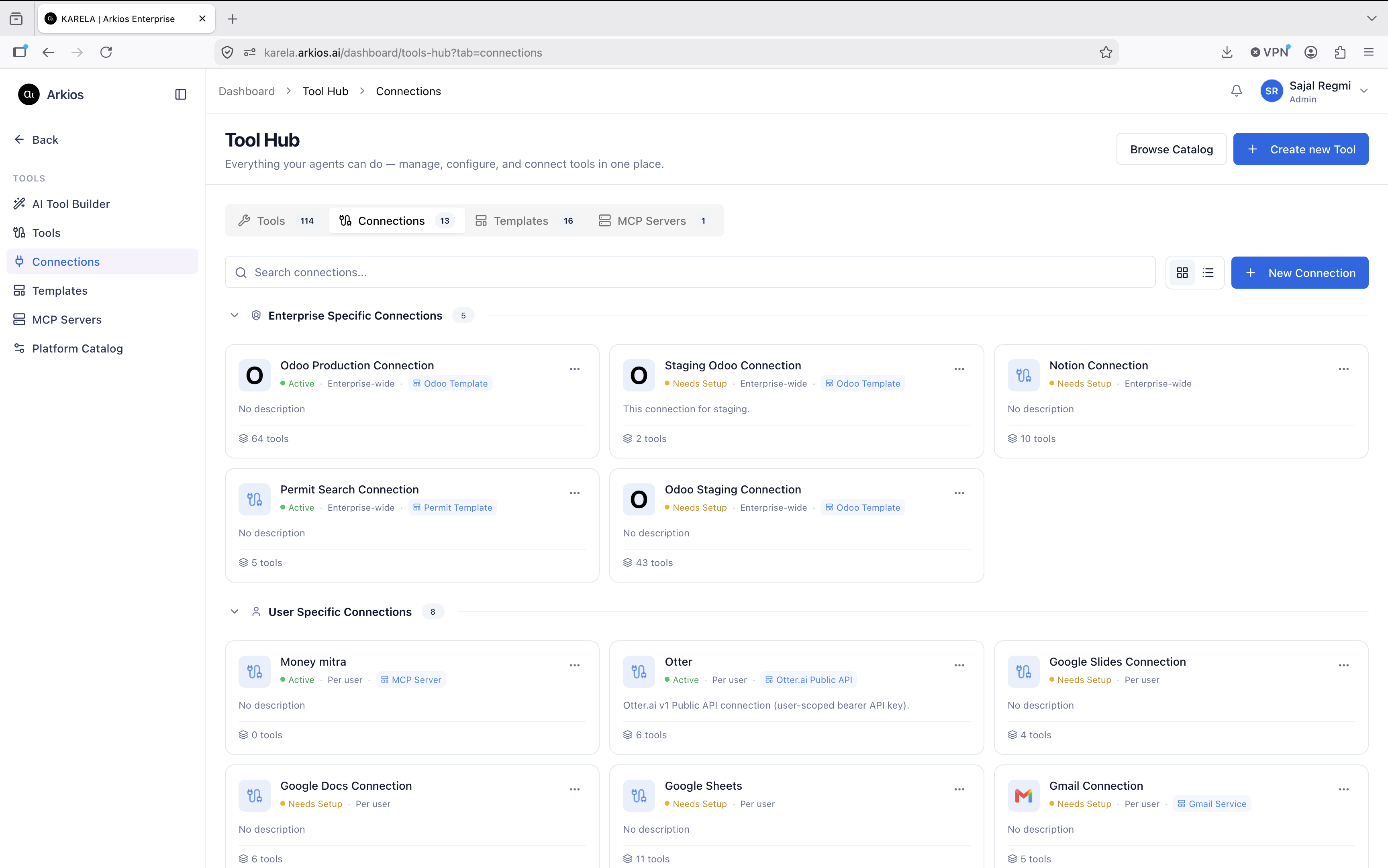
Start with the systems your teams ask about most. In the Arkios Tools Hub you can either register an existing MCP server — your own or a vendor's — or pick a connector template for common systems like Slack, Stripe, CRMs, databases, and generic HTTP APIs. For internal systems without an off-the-shelf option, Arkios supports no-code custom connectors: define the operations (endpoints, inputs, outputs) without writing integration code. See the tools and connectors documentation for the full setup walkthrough.
Step 2: Store credentials in the encrypted secrets vault
Connectors and MCP servers need credentials — API keys, OAuth tokens, database connection strings. These go into the Arkios encrypted secrets vault, never into prompts, agent configurations, or code. Agents reference credentials indirectly; the raw values are never exposed to the model, and rotating a credential is a vault update rather than a redeploy.
Step 3: Scope tool access to teams and roles
Not every agent — and not every employee — should reach every tool. Arkios lets you scope tool access per team and per role: the finance team's agents can call Stripe operations, the support team's agents can read the CRM, and neither can touch the other's tools. Start narrow. It's much easier to grant additional access when a use case justifies it than to claw back access nobody remembers granting.
Step 4: Let agents work — with full audit logging
Once tools are connected, vaulted, and scoped, your enterprise AI agents can call them in the course of real work. Every tool call is captured in audit logs: which agent called which tool, with what inputs, on whose behalf, and what came back. When compliance asks "show me everything the AI did with customer billing data last quarter," that's a query, not an archaeology project.
The full integration layer — MCP servers, connector templates, and custom connectors — is covered on the MCP & Integrations platform page.
MCP vs. custom connectors: which to choose
Both have a place, and platforms like Arkios support both side by side. A quick comparison:
| MCP servers | Custom connectors | |
|---|---|---|
| Best for | Systems with existing MCP servers; complex tools with rich capabilities | Internal APIs and systems without MCP support |
| Setup effort | Low if a server exists; moderate to build one | Low with no-code operation definitions |
| Portability | Works with any MCP-compatible client | Tied to the platform where it's defined |
| Maintenance | Owned by the server maintainer (you or a vendor) | Owned by whoever defined the operations |
A practical rule of thumb: if a maintained MCP server already exists for the system — increasingly common for major SaaS products — use it. If you're connecting a homegrown internal API, a no-code custom connector is usually faster than building an MCP server from scratch, and you can wrap it in a proper MCP server later if other applications need it. The decision isn't permanent either way; because both routes surface tools to agents identically in Arkios, switching the backing implementation doesn't disrupt the agents using it.
Security checklist for enterprise MCP
Before connecting AI agents to production systems, work through this list:
- Vault every credential. No API keys in prompts, agent instructions, environment files, or code. All secrets live in the encrypted secrets vault, referenced indirectly, and are rotated on a schedule.
- Apply least-privilege scoping. Each agent gets the minimum set of tools its job requires, scoped by team and role. A support agent doesn't need write access to billing; don't give it any.
- Prefer read-only access by default. Grant write operations only where the workflow genuinely requires them, and treat each write-capable tool as a separate access decision.
- Log every tool call. Audit logs should capture the agent, the tool, the inputs, the caller context, and the result — and be retained long enough to satisfy your compliance requirements.
- Require human-in-the-loop for sensitive actions. Refunds, data deletion, external communications, and anything irreversible should pause for human approval before the tool call executes.
- Review access on a cadence. Quarterly, ask: which tools exist, which agents can call them, and is each grant still justified? Stale access is the quiet failure mode of any integration program.
- Test failure behavior. Confirm that agents degrade gracefully when a tool errors or a credential is revoked — they should report the failure, not improvise around it.
None of this is exotic; it's the same discipline you'd apply to a new service account or a third-party integration. MCP just gives you a single layer where the controls can live.
Frequently asked questions
What is MCP in AI?
MCP (Model Context Protocol) is an open standard that lets AI models securely connect to external tools and data sources. Instead of building a custom integration for every model-and-tool pair, both sides implement one protocol: MCP servers expose tools from systems like databases and SaaS apps, and AI applications discover and call those tools through a uniform interface.
Is MCP secure for enterprise use?
The protocol itself is a transport and discovery standard — security comes from how you deploy it. Run MCP through a platform that provides credential vaulting, per-team and per-role access scoping, and tool-call audit logging, and it is substantially more securable than ad-hoc API integrations, because all AI access to internal systems flows through one controllable, observable layer.
How do I connect an AI agent to internal tools?
The short version: expose the tool through an MCP server or a connector (Arkios provides templates for Slack, Stripe, CRMs, databases, and HTTP APIs, plus no-code custom connectors for internal systems), store credentials in an encrypted secrets vault, scope access to the teams and roles that need it, and enable audit logging. Once connected, agents discover and call the tools automatically as part of their work.
What is the difference between MCP and an API?
An API is how a system exposes its functionality to any caller. MCP is a layer designed specifically for AI: it describes tools in a way models can understand and act on, standardizes discovery and invocation across all systems, and gives AI applications one consistent interface instead of a different API contract per system. An MCP server typically wraps one or more APIs and presents them as model-callable tools.
Connect your first tool this week
The gap between "we have an AI assistant" and "our AI agents do real work in our real systems" is the integration layer — and MCP has made that layer a standard rather than a custom engineering project.
Arkios gives you the full path: MCP server support, a Tools Hub with connector templates, no-code custom connectors, an encrypted secrets vault, per-team and per-role scoping, and complete tool-call audit logs — at a flat $25 per user per month. Start a 14-day free trial, connect your first tool from the Tools Hub, and see what your agents can do when they can actually reach your systems. Explore the details on the MCP & Integrations page.