
The AI Call Center Guide: Voice Agents for Business (2026)
What an AI call center is, what AI voice agents can actually do, and how to set one up step by step — a practical guide for business teams.
For all the channels that have come and gone, the phone is still where business actually happens. Deals close on calls. Support tickets that would take a dozen emails get resolved in four minutes of conversation. No-shows drop when someone calls to confirm. The phone converts — that has not changed.
What has changed is the math of staffing it. A traditional call center means hiring for peak volume and paying for the troughs, training agents who turn over in under a year, buying desk phones and PBX hardware, and accepting that nights and weekends will always be coverage gaps. For most teams, the phone is simultaneously their highest-converting channel and their most operationally painful one.
AI changes that math. Not by replacing every human on the phone — that pitch oversells the technology — but by handling the repetitive majority of calls, assisting humans on the rest, and turning every conversation into searchable data. This guide covers what an AI call center is, what AI voice agents can and cannot do, what the software stack looks like, and how to set one up without a six-month implementation project.
What is an AI call center?
An AI call center is a phone operation that uses AI voice agents and software-based calling to handle inbound and outbound calls, instead of relying entirely on human agents and physical phone hardware. Calls run through the browser rather than desk phones, AI agents can answer or place calls autonomously, and every conversation is automatically recorded, transcribed, and logged for review.
The practical differences from a traditional call center come down to three things:
- No hardware. Calls are made and received in the browser. There is no PBX to install, no desk phones to provision, and no office your agents have to sit in.
- AI on the line. AI voice agents can handle entire calls — answering common questions, confirming appointments, qualifying leads — or assist human agents during live conversations.
- Every call becomes data. Recording and transcription happen automatically, so call review stops being a spot-check exercise and becomes something you can actually search.
If you can hire someone with a laptop and a headset, you can put them on the phones the same day. That is the operational shift in one sentence.
What AI voice agents can (and can't) do today
The honest version of this section matters more than the optimistic one, because teams that deploy AI voice agents with accurate expectations keep them in production. Teams that expect magic rip them out in a month.
What AI voice agents handle well:
- Structured, repeatable conversations. Appointment confirmations, order status checks, basic FAQs, callback scheduling, and intake questions follow predictable paths. AI agents handle these reliably and at any volume.
- First-touch triage. An AI agent can answer every inbound call instantly, resolve the simple ones, and route the complex ones to a human with context already gathered. Nobody waits on hold for a question the agent could answer in thirty seconds.
- High-volume outbound. Follow-up calls, reminders, and confirmations that a human team would deprioritize when busy get made consistently, every time.
- Perfect recall. Because every call is transcribed, the agent's "memory" of what was said is exact. There is no version of "I don't remember what the customer agreed to."
What they still struggle with:
- Emotionally charged conversations. An angry customer who wants to cancel needs a human. AI agents can de-escalate to a point, but retention saves and sensitive complaints are still human work.
- Genuinely novel problems. When the situation does not match anything the agent was set up for, the right behavior is a clean handoff to a person — not improvisation.
- High-stakes judgment calls. Pricing exceptions, refund decisions outside policy, anything legal or contractual. The agent should collect information and escalate, not decide.
The operating model that works in practice is not "AI replaces the team." It is "AI handles the predictable 60–70% of call volume, and your humans spend their time on the calls that actually need them." That reframing is also why the economics work.
Anatomy of an AI-native call center
If you are evaluating AI call center software, these are the components that matter. A platform missing any of them will force you to bolt on another tool, and the integrations between calling tools are where data quietly gets lost.
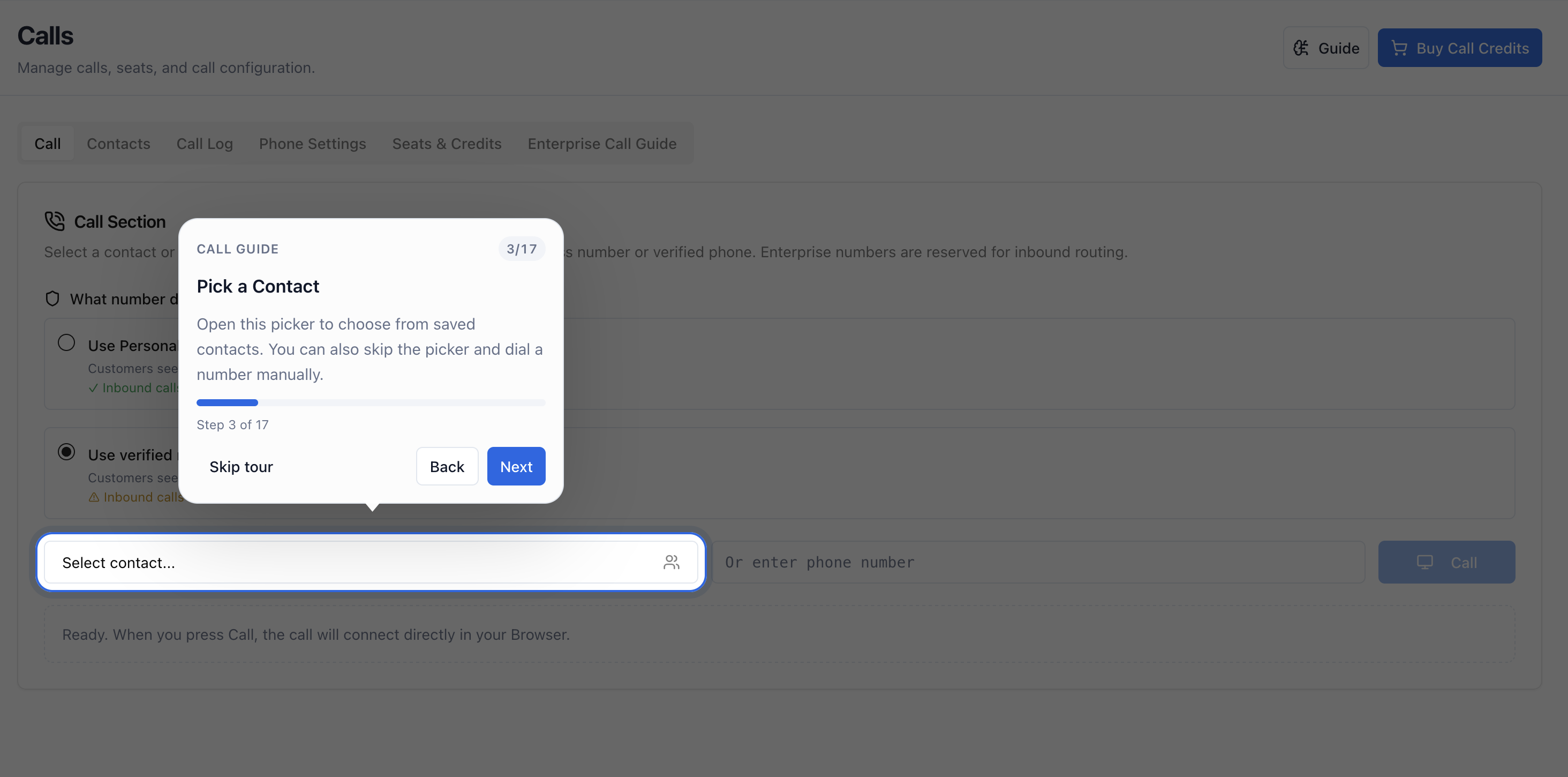
Browser-based calling. The foundation. Agents make and receive calls from a web browser with no desk phones, no softphone installs, and no hardware procurement. New hires get a login, not a shipment. Remote and hybrid teams work from anywhere without a VPN-and-VoIP configuration project.
AI voice agents. Software agents that can speak with callers — answering inbound lines, placing outbound calls, and assisting human agents during live conversations. This is the layer that changes the staffing math rather than just digitizing the old one.
Recording and transcription. Every call is recorded and transcribed automatically. This is not a nice-to-have: transcripts are how you do quality review at scale, settle "who said what" disputes, train new hires on real calls, and feed accurate notes back into your records without anyone typing them.
Contact management. Contacts live inside the calling platform, so every call is tied to a person and a history. When a customer calls back, the context is already on screen.
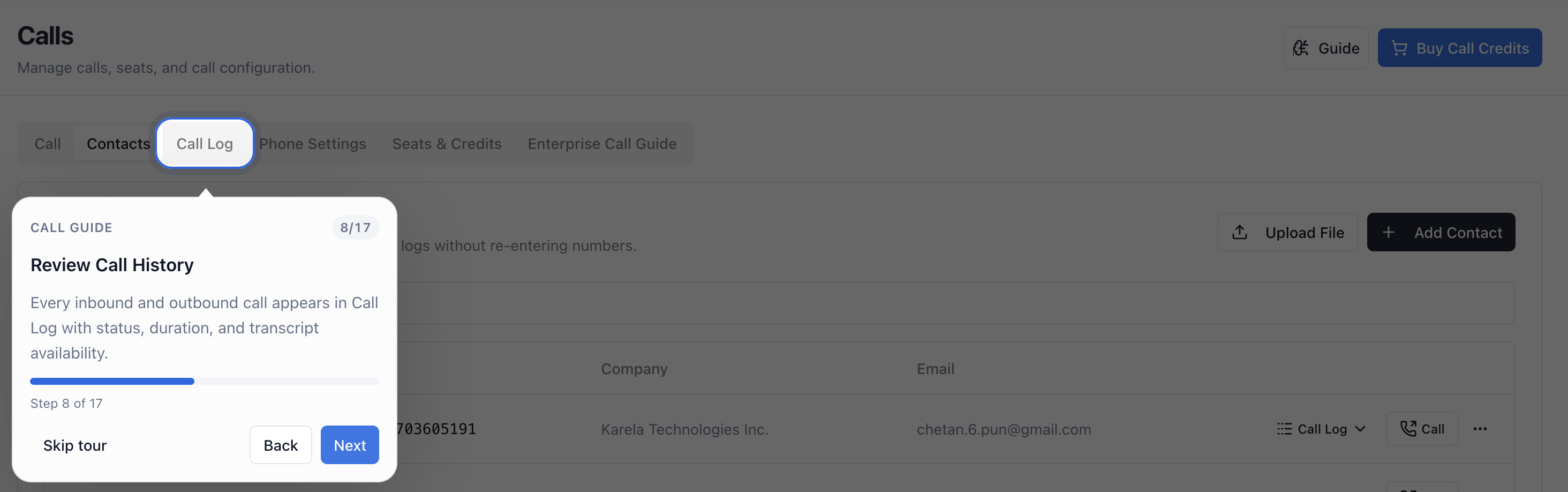
Searchable call logs. A complete, filterable record of every call — who called whom, when, how long, with the recording and transcript attached. When a manager asks "what happened with that account," the answer is a search, not an archaeology project.
Credits and seats administration. Usage-based calling costs (credits) and per-user access (seats) managed from one admin view, so finance can see exactly what the phone operation costs and ops can add or remove users in seconds.
Role-based governance and audit logs. Who can listen to recordings, who can change phone settings, who can manage numbers — controlled by role, with an audit trail of administrative actions. This matters more as you grow, and it is painful to retrofit.
Arkios ships all of this as one platform at $25 per user per month flat, plus calling credits for usage — no per-feature pricing tiers and no separate transcription bill.
Setting one up step by step
A modern AI call center is an afternoon project, not a quarter-long implementation. Here is the sequence, using Arkios as the reference (the call center overview covers each step in more depth):
Step 1: Set up numbers and seats. In phone settings, provision or configure the phone numbers your business will call from and receive calls on. Then assign seats to the people who need calling access. Roles control who can administer numbers and settings versus who just makes calls — set that up now rather than later.
Step 2: Import your contacts. Bring your customer and prospect list into contact management so every call is tied to a real record from day one, and the call log builds itself.
Step 3: Make and receive calls in the browser, with AI assistance. Your team opens the platform in a browser and starts calling — no installs, no hardware. Configure AI voice agents for the call types you want automated first: an inbound line answered instantly, or outbound confirmations placed on schedule. Start with one narrow, high-volume call type rather than trying to automate everything at once. The making calls guide walks through the calling workflow itself.
Step 4: Review transcripts and logs. Within the first week, build the habit that makes the whole system compound: review call transcripts and logs regularly. Search for the questions customers actually ask, find the calls where the AI agent escalated, and use what you learn to tighten both your agent configuration and your human scripts. The teams that get the most out of AI calling are the ones that treat transcripts as a feedback loop, not a compliance archive.
That is the entire setup. Numbers and seats, contacts, calls, review. Most teams are making their first AI-assisted calls the same day they sign up.
Use cases that pay off first
Start where call volume is high, conversations are structured, and the cost of a dropped ball is measurable.
Outbound follow-ups. The follow-up call that never happens is the most expensive call in your business. Leads that requested a callback, quotes that went quiet, customers due for renewal — AI voice agents make these calls consistently, and the transcript tells you exactly where each conversation landed.
Inbound support lines. Hours, order status, basic account questions, and "where do I find X" make up a large share of inbound volume. An AI agent answers instantly, resolves the routine calls, and hands the rest to a human with the situation already summarized. Hold time disappears for the majority of callers.
Appointment confirmations. No-shows are pure waste, and confirmation calls are the most mechanical work a human can be assigned. This is usually the fastest payback of any AI calling use case: high volume, fully scripted, directly measurable in the no-show rate.
Sales qualification. An AI phone agent can run first-pass qualification — budget, timeline, fit questions — so your sales team spends its calls on prospects who are actually worth the time. The transcript means reps walk into the second call already informed.
The common thread: pick one, measure it for two weeks, then expand. Teams that try to automate every call type on day one spend their energy configuring instead of learning.
Compliance and recording basics
Recording calls is regulated, and the rules vary by country and by state or province. This is general guidance, not legal advice — confirm the requirements for every jurisdiction you call into with qualified counsel.
- Get consent. Many jurisdictions require all parties to consent to recording; others require only one party. The simple, safe pattern is a disclosure at the start of every recorded call — "this call may be recorded" — regardless of where the caller is. If an AI agent is on the line, disclose that too; it is increasingly required and it is the right thing to do anyway.
- Review transcripts, especially early. When you first deploy AI voice agents, read the transcripts of their calls. You are checking that the agent stays within the scope you set, handles escalations cleanly, and never makes commitments it should not. Transcription makes this audit cheap — use it.
- Control access. Recordings and transcripts contain customer data. Role-based permissions and audit logs exist so you can limit who listens and prove who accessed what. Configure them before you need them.
- Know your retention obligations. Some industries require keeping call records for set periods; others require deleting them. Map your retention policy to your actual legal obligations rather than defaulting to "keep everything forever."
None of this is a reason to avoid AI calling — human call centers carry the same obligations. The difference is that with automatic transcription and audit logs, demonstrating compliance is dramatically easier than it ever was with a wall of desk phones.
Frequently asked questions
How much does an AI call center cost?
Traditional call center software stacks commonly run $50–150 per agent per month once you add dialing, recording, transcription, and analytics, before any hardware. Arkios is $25 per user per month flat, with calling credits covering usage — and a 14-day free trial to test it against your real call volume before paying anything.
Can AI voice agents replace human agents entirely?
No, and you should be skeptical of any vendor who says yes. AI voice agents reliably handle structured, repetitive calls — confirmations, FAQs, qualification, triage — which is typically the majority of volume. Emotionally charged, novel, or high-stakes conversations still need humans. The realistic outcome is a smaller human team focused on the calls that matter.
Do I need special hardware or desk phones for an AI call center?
No. Browser-based platforms like Arkios run entirely in a web browser — agents need a computer, a headset, and a login. There is no PBX, no desk phone provisioning, and no on-site equipment, which also means remote and hybrid teams work without any extra setup.
How long does it take to set up AI call center software?
For a small or mid-sized team: hours, not months. The setup is configuring numbers and seats, importing contacts, and pointing an AI voice agent at your first call type. Plan a couple of weeks of transcript review and tuning after launch — that iteration, not the installation, is where the real work is.
Put your phones on better math
The phone is not going anywhere — it is still where your revenue and your hardest support moments live. The choice is whether you keep staffing it the old way or let AI absorb the repetitive majority while your team handles the calls that need a human.
Arkios gives you the full stack — browser calling, AI voice agents, recording and transcription, contacts, searchable logs, and admin controls — for $25 per user per month plus credits. Start a 14-day free trial, point an AI agent at your highest-volume call type, and read the transcripts. The math will speak for itself.